
Download Actual Drawing – web page design, visual publishing, drag-and-drop, no HTML, image editing, vector layers, web albums, interactive buttons
Overview
Actual Drawing is a visual publishing tool designed to empower users to create web pages without requiring knowledge of HTML. The application targets individuals and professionals seeking an accessible, intuitive way to design functional and visually engaging websites. Its primary purpose is to streamline the web design process through a drag-and-drop interface, making it suitable for beginners and experienced designers alike. By eliminating the need to write code, Actual Drawing lowers the barrier to entry for web publishing, enabling users to focus on creativity rather than syntax.
The app is particularly useful for small business owners, educators, and content creators who want to publish digital content online without relying on developers. It supports the creation of web albums, interactive forms, and dynamic pages with custom rollover buttons—features essential for modern web presence. The integration of built-in image editing tools and vector-based design layers ensures that visual quality remains high across different screen sizes and resolutions.
Developed by PY Software, Actual Drawing represents a focused solution in the productivity category. While specific details about the company’s background were not provided, the application’s feature set reflects a commitment to usability and design flexibility. The latest version, 7.3, includes updated graphic effects and bug fixes, indicating ongoing development and support. In the broader app ecosystem, Actual Drawing fills a niche for non-technical users who need a reliable, all-in-one tool for web content creation.
Key Features & Functionality
- Drag-and-Drop Page Content: Users can assemble web pages by dragging elements into place, bypassing the need for manual coding. This approach is ideal for quickly prototyping layouts or building full websites without technical expertise.
- Built-in Image Manipulation Tools: The app includes native tools for editing images directly within the interface. Users can apply effects like glow, shadow, and transparency, enhancing visual appeal without switching to external software.
- Resolution-Independent Vector Layers: Design elements are created using vector layers, allowing them to scale to any size without quality loss. This ensures crisp visuals on high-resolution displays and various devices.
- Custom Rollover Buttons and JavaScript Support: The tool simplifies the creation of interactive buttons with hover effects. It automatically generates the necessary JavaScript and images, enabling dynamic user interaction with minimal effort.
- Publishing, Forms, and Web Albums: Actual Drawing supports site publishing, form creation, and the organization of photo collections into web albums. Built-in tools help users verify links, submit sites to search engines, and manage multiple pages efficiently through a batch processor.
For example, a teacher could use the app to create a class website with student projects in a web album, add interactive quizzes via forms, and include navigation buttons with rollover effects—all without writing a single line of code. Similarly, a small business owner could build a promotional site with product images, contact forms, and responsive layouts using the vector tools.
Interface, UX & Performance
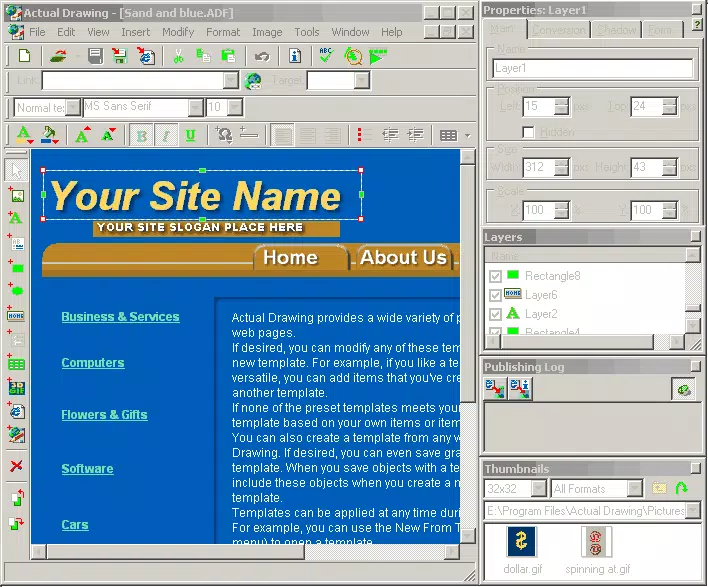
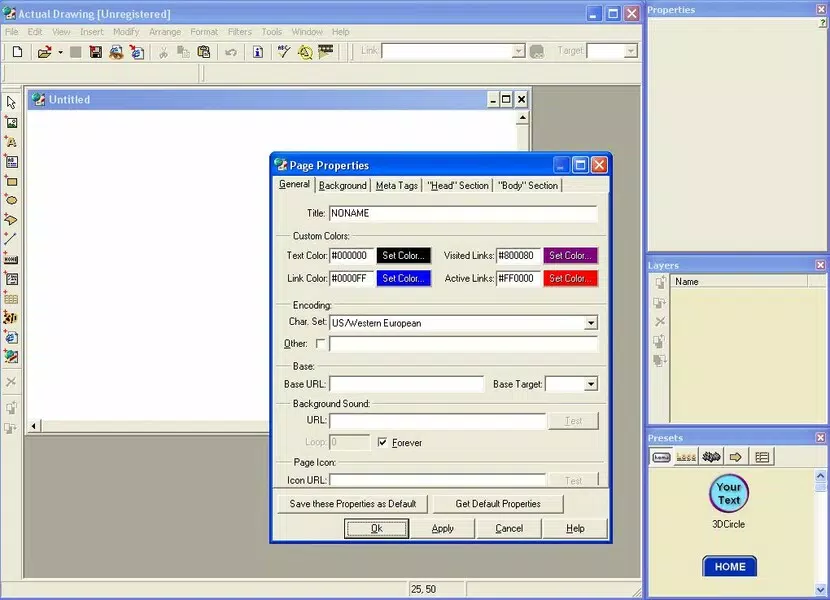
Actual Drawing features a clean, layout-focused interface that prioritizes visual design over technical complexity. The workspace is organized around a central canvas where users can place and manipulate elements using drag-and-drop mechanics. Navigation is intuitive, with toolbars and menus positioned for quick access to core functions like image editing, layer management, and publishing options.
The application’s visual style emphasizes functionality and clarity, with a minimalist design that reduces cognitive load. Users can easily switch between different layers, adjust properties, and preview their work in real time. Responsiveness is maintained across various screen sizes, though specific performance benchmarks were not disclosed.
Although the developer did not list formal performance metrics, the app’s lightweight file size of 24.5 MB suggests efficient resource usage. Stability appears to be well-maintained, as version 7.3 includes error fixes that improve overall reliability. The interface remains responsive during design tasks, even when handling multiple vector layers and effects.
Platform Compatibility & Technical Requirements
Actual Drawing is designed for the Windows platform and is compatible with the latest versions of the operating system. The software requires a standard Windows environment, though specific minimum OS requirements were not listed by the developer. The installation file size is 24.5 MB, indicating a compact footprint that supports quick downloads and minimal storage usage.
While the app is not available on mobile platforms, its desktop focus aligns with the needs of users who require advanced design capabilities. The lack of platform-specific details for macOS or Linux was not disclosed, and compatibility with older Windows versions remains unspecified. Users should verify system compatibility before installation.
Pros and Cons
- Intuitive drag-and-drop interface ideal for non-technical users
- Integrated image editing tools eliminate the need for third-party software
- Resolution-independent vector layers ensure high-quality output
- Automated JavaScript generation for interactive elements
- Comprehensive publishing and site management features
- Only available for Windows, limiting cross-platform access
- Price point of $49.95 may be high for casual users
- No mobile or web version currently available
- Specific system requirements were not provided
- Limited documentation or community support details
FAQ
Is Actual Drawing free to download?
Actual Drawing is not free. It is a paid application priced at $49.95. There is no free version or trial period mentioned in the provided information.
Can I use Actual Drawing on my Mac or Linux device?
The app is designed for Windows only. There is no official support for macOS or Linux. The developer did not specify availability on other platforms.
Does Actual Drawing require an internet connection?
While the app does not require a constant internet connection for basic design tasks, some features like publishing to search engines or checking broken links may require online access.
How often are updates released?
Version 7.3 was released in 2024, indicating active development. However, the frequency of future updates was not disclosed by the developer.
Is the software secure to install?
Actual Drawing is developed by PY Software. The application is distributed through official channels. Users should ensure they download the software from trusted sources to maintain security.
Final Thoughts
Actual Drawing stands out as a powerful, no-code solution for web page design, particularly for users who value visual control and interactivity without technical overhead. Its combination of drag-and-drop functionality, built-in image editing, and vector-based scalability makes it a compelling tool for educators, small business owners, and content creators. While the Windows-only availability and price point may limit accessibility, the app delivers strong value for those seeking a streamlined, all-in-one publishing experience.
For users who want to publish professional-quality websites without learning HTML, Actual Drawing offers a practical and efficient alternative. The inclusion of interactive buttons, form creation, and web album tools enhances its utility in real-world scenarios. With ongoing updates and a focus on usability, it remains a relevant choice in the productivity space.
Download Actual Drawing now


